

Computer Science | CBSE XII | Encoding Schemes and Number System Class 11 Notes with Solved Examples & MCQs (Chapter 2) | NCERT Solutions For Class 11 Computer Science Chapter 2 | Best Guide 2026. It is required for Grade 11 students to build a strong foundation in the subject. Understanding the chapter thoroughly helps students grasp key concepts, improve comprehension, and perform well in exams.
In this article, Computer Science | CBSE XII | Encoding Schemes and Number System Class 11 Notes with Solved Examples & MCQs (Chapter 2) | NCERT Solutions For Class 11 Computer Science Chapter 2 | Best Guide 2026, we (ThinkSphereEdu.com) provide a detailed explanation to make learning easier and more effective. Whether you are a student looking for well-explained solutions or a parent guiding your child, this guide will be a helpful resource for mastering the chapter with confidence.
- What is Encoding? (Encoding Schemes and Number System Class 11 Notes)
- Types of Encoding Schemes (Encoding Schemes and Number System Class 11 Notes)
- What is a Number System? (Encoding Schemes and Number System Class 11 Notes)
- Positional Value System (Encoding Schemes and Number System Class 11 Notes)
- Why Octal and Hexadecimal Exist (Encoding Schemes and Number System Class 11 Notes)
- Converting Decimal -> Binary/Octal/Hexadecimal (Encoding Schemes and Number System Class 11 Notes)
- Converting Binary/Octal/Hex -> Decimal (Encoding Schemes and Number System Class 11 Notes)
- Converting Directly Between Binary and Octal/Hex (Encoding Schemes and Number System Class 11 Notes)
- Converting Numbers with a Fractional Part (Encoding Schemes and Number System Class 11 Computer Science Chapter 2 Notes)
- Quick recap (Encoding Schemes and Number System Class 11 Notes)
- Exercise (Encoding Schemes and Number System Class 11 Computer Science Notes)
- Class 11 Computer Science Chapter 2 Important Questions and Answers | Encoding Schemes and Number System
CBSE | Encoding Schemes and Number System Class 11 Notes with Solved Examples | Class 11
What is Encoding? (Encoding Schemes and Number System Class 11 Notes)
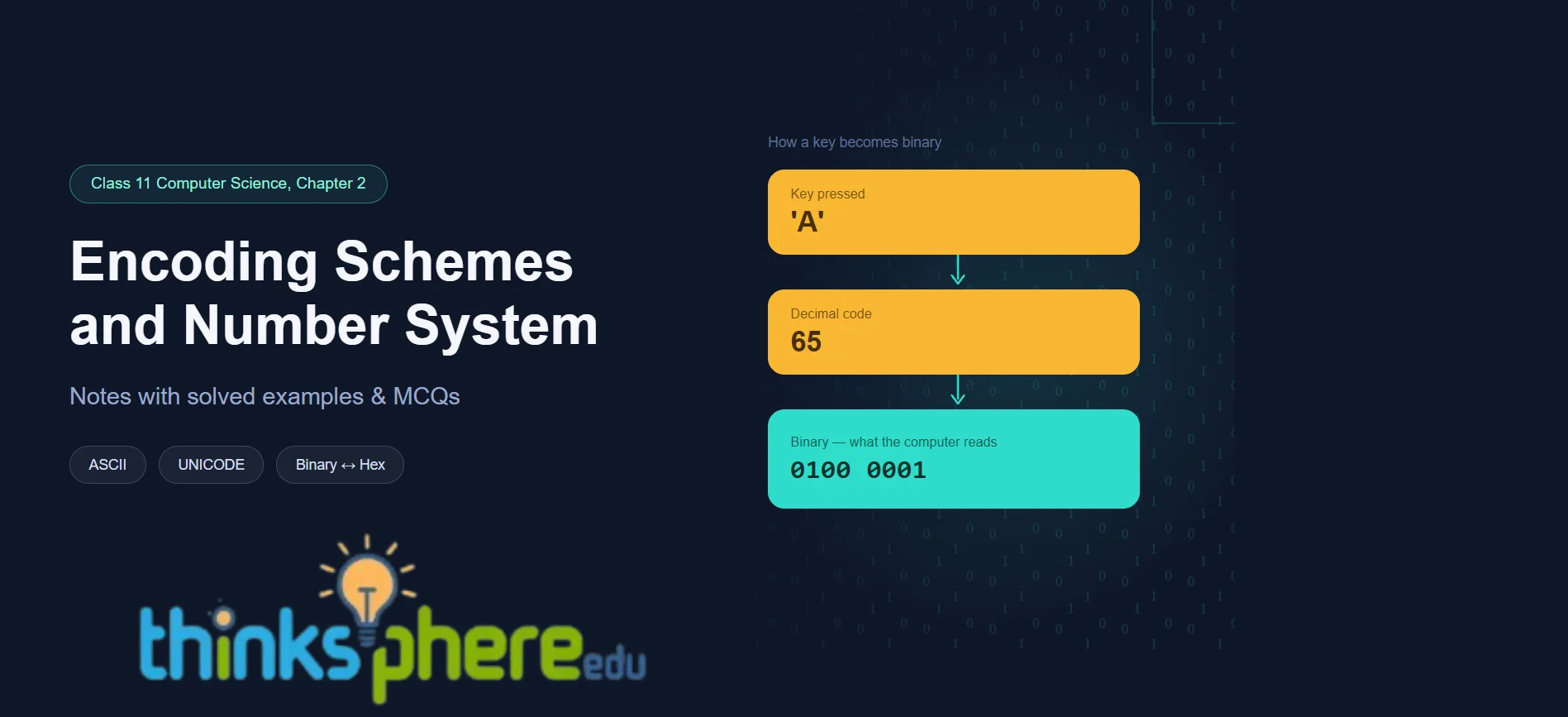
Computers only understand 0s and 1s (binary). So whenever you press a key, the computer can’t understand the letter directly – it needs a translation process.
- Step 1: The key you press (say, ‘A’) is mapped to a fixed code value (a decimal number).
- Step 2: That decimal number is converted into its binary form, which the computer actually processes.
This whole process – turning readable data into a coded form – is called encoding.

Types of Encoding Schemes (Encoding Schemes and Number System Class 11 Notes)
Since every device needs to understand text the same way, standard schemes were created:
- ASCII (American Standard Code) – uses 7 bits, so it can represent 2⁷ = 128 characters. Covers English only.
- ISCII (Indian Script Code) – uses 8 bits (256 characters). It keeps all 128 ASCII codes and adds 128 more for Indian language letters (“aksharas”).
- UNICODE – the universal solution. It gives a unique number to every character of every language, on any device or software. Common formats: UTF-8, UTF-16, UTF-32.

Note: Remind this table (ASCII ISCII UNICODE Class 11)

What is a Number System? (Encoding Schemes and Number System Class 11 Notes)
A number system is just a method to write numbers. Every number system has its own set of digits, and the count of those digits is called its base (or radix).
Computers work with four number systems:


Positional Value System (Encoding Schemes and Number System Class 11 Notes)
Every number is “positional” – a digit’s value depends on where it sits.
- Rightmost digit before the decimal point = position 0. Positions increase going left (1, 2, 3…).
- First digit after the decimal point = position −1. Positions decrease going right (−1, −2…).
- Positional value of a digit = (base) raised to its position.
- Multiply each digit by its positional value, then add everything up — that’s the number’s actual value.

Why Octal and Hexadecimal Exist (Encoding Schemes and Number System Class 11 Notes)
Binary numbers get very long as values grow – hard to read or remember. So:
- Octal groups binary in sets of 3 bits (since 2³ = 8) for a shorter form.
- Hexadecimal groups binary in sets of 4 bits (since 2⁴ = 16) for an even shorter form.
That’s why a 16-bit memory address like 1100000011110001 becomes just C0F1 in hex – much easier to remember. Web colors work the same way: a 24-bit RGB color becomes a compact 6-digit hex code (e.g., pure red = FF0000).
Converting Decimal -> Binary/Octal/Hexadecimal (Encoding Schemes and Number System Class 11 Notes)
Use the divide-and-note-remainder method:

Example: (65)₁₀ -> divide by 2 repeatedly -> remainders bottom-to-top -> (1000001)₂. Same method works for octal (divide by 8) and hex (divide by 16).
Converting Binary/Octal/Hex -> Decimal (Encoding Schemes and Number System Class 11 Notes)
Use the multiply-and-add (positional value) method – the reverse idea:
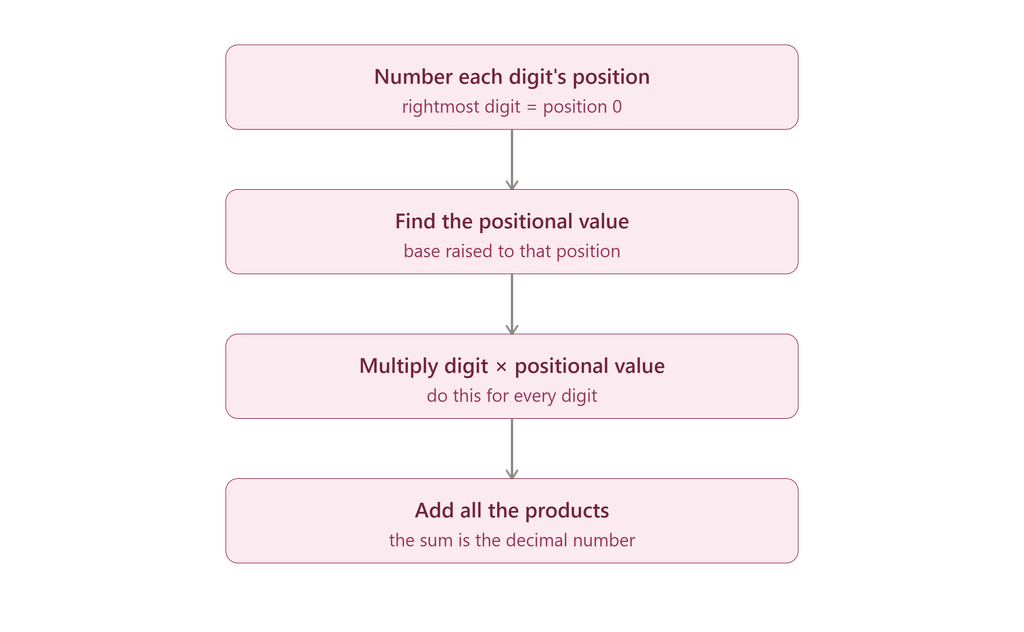
Example: (1101)₂ -> 1×2³ + 1×2² + 0×2¹ + 1×2⁰ = 8+4+0+1 = (13)₁₀. Same idea works for octal (powers of 8) and hex (powers of 16), using A=10, B=11…F=15 for hex letters.
Converting Directly Between Binary and Octal/Hex (Encoding Schemes and Number System Class 11 Notes)
No need to go through decimal – just group the bits:
- Binary -> Octal: group bits in sets of 3 (from right to left), convert each group to its octal digit.
- Binary -> Hex: group bits in sets of 4 (from right to left), convert each group to its hex digit.
- To go the other way (octal/hex -> binary), just expand each digit back into its 3-bit or 4-bit binary form.

So (10101100)₂ = (254)₈ = (AC)₁₆ – same value, three different “spellings.”
Converting Numbers with a Fractional Part (Encoding Schemes and Number System Class 11 Computer Science Chapter 2 Notes)
For the part after the decimal point, the method flips – instead of dividing, you multiply repeatedly:

Example: (0.25)₁₀ -> 0.25×2=0.50 -> 0.50×2=1.00, fraction becomes 0, stop -> (0.01)₂.
For the reverse (fraction in another base -> decimal), just use negative powers of the base (10⁻¹, 10⁻², or 2⁻¹, 2⁻²…) in the multiply-and-add method from section 7.
Quick recap (Encoding Schemes and Number System Class 11 Notes)
- Encoding = converting readable text into codes computers can process (ASCII → ISCII → UNICODE, in order of how much they cover).
- A number system is a way to write numbers, defined by its base (count of digits).
- Computers use 4 systems: Binary (2), Octal (8), Decimal (10), Hexadecimal (16).
- Every digit has a positional value = base^position; multiply and sum to get the number.
- Decimal -> other base: divide repeatedly, read remainders bottom-up.
- Other base -> decimal: multiply each digit by its positional value, add up.
- Binary <–> Octal/Hex: just group bits in 3s or 4s — no decimal step needed.
- Fractions: multiply repeatedly (not divide) and read integer parts top-down.
NCERT Solutions for Class 11 Computer Science Chapter 2 – Encoding Schemes and Number System (All Exercise Questions Answered)
Exercise (Encoding Schemes and Number System Class 11 Computer Science Notes)
1. Write base values of binary, octal and hexadecimal number system.
Answer:
- Binary – 2
- Octal – 8
- Hexadecimal – 16
2. Give full form of ASCII and ISCII.
Answer:
- ASCII = American Standard Code for Information Interchange
- ISCII = Indian Script Code for Information Interchange
Binary Octal Decimal Hexadecimal Conversion Class 11
3. Try the following conversions.

Answer:
(i) (514)₈ = (?)₁₀
= 5×8² + 1×8¹ + 4×8⁰
= 320 + 8 + 4
= 332₁₀
(ii) (220)₈ = (?)₂
2 -> 010
2 -> 010
0 -> 000
= 10010000₂
(iii) (76F)₁₆ = (?)₁₀
= 7×16² + 6×16¹ + 15×16⁰
= 1792 + 96 + 15
= 1903₁₀
(iv) (4D9)₁₆ = (?)₁₀
= 4×16² + 13×16 + 9
= 1024 + 208 + 9
= 1241₁₀
(v) (11001010)₂ = (?)₁₀
= 128 + 64 + 8 + 2
= 202₁₀
(vi) (1010111)₂ = (?)₁₀
= 64 + 16 + 4 + 2 + 1
= 87₁₀
4. Do the following conversions from decimal numbers to other number systems.

Answer:
(i) (54)₁₀ = (?)₂
Divide 54 repeatedly by 2 and write remainders from bottom to top.
54 ÷ 2 = 27 R0
27 ÷ 2 = 13 R1
13 ÷ 2 = 6 R1
6 ÷ 2 = 3 R0
3 ÷ 2 = 1 R1
1 ÷ 2 = 0 R1
Answer: (54)₁₀ = (110110)₂
(ii) (120)₁₀ = (?)₂
120 ÷ 2 = 60 R0
60 ÷ 2 = 30 R0
30 ÷ 2 = 15 R0
15 ÷ 2 = 7 R1
7 ÷ 2 = 3 R1
3 ÷ 2 = 1 R1
1 ÷ 2 = 0 R1
Answer: (120)₁₀ = (1111000)₂
(iii) (76)₁₀ = (?)₈
76 ÷ 8 = 9 R4
9 ÷ 8 = 1 R1
1 ÷ 8 = 0 R1 (Reading remainders from bottom to top)
Answer: (76)₁₀ = (114)₈
(iv) (889)₁₀ = (?)₈
889 ÷ 8 = 111 R1
111 ÷ 8 = 13 R7
13 ÷ 8 = 1 R5
1 ÷ 8 = 0 R1
Answer: (889)₁₀ = (1571)₈
(v) (789)₁₀ = (?)₁₆
789 ÷ 16 = 49 R5
49 ÷ 16 = 3 R1
3 ÷ 16 = 0 R3
Answer: (789)₁₀ = (315)₁₆
(vi) (108)₁₀ = (?)₁₆
108 ÷ 16 = 6 R12
12 = C in hexadecimal.
Answer: (108)₁₀ = (6C)₁₆
5. Express the following octal numbers into their equivalent decimal numbers.
- 145
- 6760
- 455
- 10.75
Answer:
(i) (145)₈ = (?)₁₀
= 1×8² + 4×8¹ + 5×8⁰
= 64 + 32 + 5
Answer: 101₁₀
(ii) (6760)₈ = (?)₁₀
= 6×8³ + 7×8² + 6×8¹ + 0×8⁰
= 3072 + 448 + 48 + 0
Answer: 3568₁₀
(iii) (455)₈ = (?)₁₀
= 4×8² + 5×8¹ + 5×8⁰
= 256 + 40 + 5
Answer: 301₁₀
(iv) (10.75)₈ = (?)₁₀
= 1×8¹ + 0×8⁰ + 7×8⁻¹ + 5×8⁻²
= 8 + 0 + 0.875 + 0.078125
Answer: 8.953125₁₀
6. Express the following decimal numbers into hexadecimal numbers.
- 548
- 4052
- 58
- 100.25
Answer:
(i) 548₁₀ = (?)₁₆
548 ÷ 16 = 34 R4
34 ÷ 16 = 2 R2
2 ÷ 16 = 0 R2
Answer: 224₁₆
(ii) 4052₁₀ = (?)₁₆
4052 ÷ 16 = 253 R4
253 ÷ 16 = 15 R13 (D)
15 ÷ 16 = 0 R15 (F)
Answer: FD4₁₆
(iii) 58₁₀ = (?)₁₆
58 ÷ 16 = 3 R10
10 = A
Answer: 3A₁₆
(iv) 100.25₁₀ = (?)₁₆
Integer part:
100 ÷ 16 = 6 R4
=> 64₁₆
Fractional part:
0.25 × 16 = 4.0
Answer: 64.4₁₆
7. Express the following hexadecimal numbers into equivalent decimal numbers.
- 4A2
- 9E1A
- 6BD
- 6C.34
Answer:
(i) (4A2)₁₆ = (?)₁₀
= 4×16² + 10×16¹ + 2×16⁰
= 1024 + 160 + 2
Answer: 1186₁₀
(ii) (9E1A)₁₆ = (?)₁₀
= 9×16³ + 14×16² + 1×16¹ + 10×16⁰
= 36864 + 3584 + 16 + 10
Answer: 40474₁₀
(iii) (6BD)₁₆ = (?)₁₀
= 6×16² + 11×16¹ + 13×16⁰
= 1536 + 176 + 13
Answer: 1725₁₀
(iv) (6C.34)₁₆ = (?)₁₀
= 6×16¹ + 12×16⁰ + 3×16⁻¹ + 4×16⁻²
= 96 + 12 + 0.1875 + 0.015625
Answer: 108.203125₁₀
8. Convert the following binary numbers into octal and hexadecimal numbers.
- 1110001000
- 110110101
- 1010100
- 1010.1001
Answer:
(i) (1110001000)₂
Octal:
001 110 001 000
= 1 6 1 0
Octal = (1610)₈
Hexadecimal:
0011 1000 1000
= 3 8 8
Hexadecimal = (388)₁₆
(ii) (110110101)₂
Octal:
110 110 101
= 6 6 5
Octal = (665)₈
Hexadecimal:
0001 1011 0101
= 1 B 5
Hexadecimal = (1B5)₁₆
(iii) (1010100)₂
Octal:
001 010 100
= 1 2 4
Octal = (124)₈
Hexadecimal:
0101 0100
= 5 4
Hexadecimal = (54)₁₆
(iv) (1010.1001)₂
Octal:
001 010 . 100 100
= 1 2 . 4 4
Octal = (12.44)₈
Hexadecimal:
1010 . 1001
= A . 9
Hexadecimal = (A.9)₁₆
9. Write binary equivalent of the following octal numbers.
- 2306
- 5610
- 742
- 65.203
Answer:
(i) (2306)₈
2 -> 010
3 -> 011
0 -> 000
6 -> 110
Answer: 010011000110₂
(ii) (5610)₈
5 -> 101
6 -> 110
1 -> 001
0 -> 000
Answer: 101110001000₂
(iii) (742)₈
7 -> 111
4 -> 100
2 -> 010
Answer: 111100010₂
(iv) (65.203)₈
6 -> 110
5 -> 101
2 -> 010
0 -> 000
3 -> 011
Answer: 110101.010000011₂
10. Write binary representation of the following hexadecimal numbers.
- 4026
- BCA1
- 98E
- 132.45
Answer:
(i) (4026)₁₆
4 -> 0100
0 -> 0000
2 -> 0010
6 -> 0110
Answer: 0100000000100110₂
(ii) (BCA1)₁₆
B -> 1011
C -> 1100
A -> 1010
1 -> 0001
Answer: 1011110010100001₂
(iii) (98E)₁₆
9 -> 1001
8 -> 1000
E → 1110
Answer: 100110001110₂
(iv) (132.45)₁₆
1 -> 0001
3 -> 0011
2 -> 0010
4 -> 0100
5 -> 0101
Answer: 000100110010.01000101₂
11. How does computer understand the following text? (hint: 7 bit ASCII code).
- HOTS
- Main
- CaSe
Answer:
(i) HOTS

(ii) Main

(iii) Case

12. The hexadecimal number system uses 16 literals (0 – 9, A – F). Write down its base value.
Answer: The base (or radix) of a number system is equal to the total number of symbols (digits) used in that system.
In the hexadecimal number system, the symbols are:
0, 1, 2, 3, 4, 5, 6, 7, 8, 9, A, B, C, D, E, F
There are 16 symbols in total.
Therefore,
Base Value = 16
13. Let X be a number system having B symbols only. Write down the base value of this number system.
Answer: The base of any number system is always equal to the number of symbols (digits) available in that system.
For example:
- Binary system has 2 symbols (0,1) → Base = 2
- Octal system has 8 symbols (0–7) → Base = 8
- Decimal system has 10 symbols (0–9) → Base = 10
- Hexadecimal system has 16 symbols (0–9, A–F) → Base = 16
Similarly, if a number system X has B symbols, then:
Base Value = B
Therefore, Base(X) = B
14. Write the equivalent hexadecimal and binary values for each character of the phrase given below.
‘‘ हम सब एक”
Answer:

15. What is the advantage of preparing a digital content in Indian language using UNICODE font?
Answer: Unicode provides a universal standard encoding system. Content created using Unicode can be viewed, edited and exchanged across different computers, operating systems and applications without changing the characters or fonts.
16. Explore and list the steps required to type in an Indian language using UNICODE.
Answer: Steps required to type in an Indian language using Unicode.
- Install/enable the required Indian language keyboard.
- Add the language from Operating System settings.
- Select a Unicode font (Mangal, Nirmala UI, Aparajita, etc.).
- Switch keyboard language.
- Start typing in the selected Indian language.
- Save the document normally; Unicode text remains portable across systems.
17. Encode the word ‘COMPUTER’ using ASCII and convert the encode value into binary values.

ASCII: 67 79 77 80 85 84 69 82
Binary:
1000011 1001111 1001101 1010000 1010101 1010100 1000101 1010010
Class 11 Computer Science Chapter 2 Important Questions and Answers | Encoding Schemes and Number System
1. What is Encoding?
Answer: Encoding is the mechanism of converting data into an equivalent code using a specific coding scheme.
When a key is pressed on the keyboard, it is internally mapped to a unique code value which is then converted into binary form so that the computer can understand it. Since a computer understands only binary language (0 and 1), encoding is necessary for processing textual data.
2. Why are encoding schemes required?
Answer: Different computers represented keyboard characters in different ways. As a result, computers were unable to communicate with each other. To solve this problem, standard encoding schemes were developed.
Encoding schemes assign a unique code to every character, numeral and symbol, making communication and data exchange possible among different computer systems.
3. What is ASCII? State its features.
Answer: ASCII (American Standard Code for Information Interchange) is a standard character encoding scheme developed in the early 1960s.
Features:
- Uses 7 bits to represent characters.
- Can represent 2⁷ = 128 characters.
- Provides a standard representation for English characters.
- It is one of the most commonly used coding schemes.
ASCII can encode only the English language character set.
4. Encode the word DATA using ASCII.
Answer:

ASCII representation of DATA:
68 65 84 65
Binary representation:
1000100 1000001 1010100 1000001
5. What is ISCII?
Answer: ISCII (Indian Script Code for Information Interchange) is a coding standard developed in India during the mid-1980s to support Indian languages.
Features:
- Uses 8-bit representation.
- Can represent 2⁸ = 256 characters.
- Retains all 128 ASCII codes.
- Uses additional codes for Indian language characters.
ISCII facilitates the use of Indian languages on computers.
6. What is Unicode? Why is it needed?
Answer: Unicode is a universal character encoding standard developed to include characters of all written languages of the world.
Unicode assigns a unique number to every character irrespective of device, operating system or software application.
Unicode was developed because different encoding schemes could not communicate with each other and text created using one encoding scheme was not recognized by another.
7. What is Unicode? Why is it needed?
Answer:
- Supports almost all written languages of the world.
- Provides a unique code for every character.
- Works across different devices.
- Works on different operating systems.
- Ensures compatibility among software applications.
8. What is a Number System?
Answer: A number system is a method used to represent numbers. Every number system has a set of unique symbols called literals. The count of these symbols is known as the base or radix of the number system.
9. What is a Positional Number System?
Answer: A positional number system is a number system in which the value of a digit depends upon its position within the number.
The positional value is calculated using the position number and the base value of the number system.
10. Differentiate between Decimal, Binary, Octal and Hexadecimal Number Systems.
Answer:

11. Why does a computer use the binary number system?
Answer: The integrated circuits of a computer are made up of transistors.
A transistor has only two states:
- ON (High) -> 1
- OFF (Low) -> 0
Therefore, computers use the binary number system consisting of only 0 and 1.
12. Why is the octal number system used?
Answer: Large binary numbers are difficult to read and manage.
The octal number system provides a compact representation of binary numbers. One octal digit represents three binary digits because:
8 = 2³
Hence, octal numbers simplify binary representation.
13. Why is the hexadecimal number system used?
Answer: Hexadecimal numbers are used for compact representation of binary numbers.
One hexadecimal digit represents four binary digits because:
16 = 2⁴
Therefore, hexadecimal numbers make large binary values easier to read and remember.
14. Write any two applications of hexadecimal numbers.
Answer:
(i) Memory Address Representation
Memory addresses are usually 16-bit or 32-bit numbers. Hexadecimal notation provides a compact and easy-to-read representation of these addresses.
(ii) Colour Codes in Webpages
Web colours are represented using RGB values. Hexadecimal notation is used to represent these colour values compactly.
Example:
Red = (FF,00,00)
White = (FF,FF,FF)
Binary Octal Decimal Hexadecimal Conversion Class 11
15. Convert (122)₁₀ to Binary.
Answer:
122 ÷ 2 = 61 R0
61 ÷ 2 = 30 R1
30 ÷ 2 = 15 R0
15 ÷ 2 = 7 R1
7 ÷ 2 = 3 R1
3 ÷ 2 = 1 R1
1 ÷ 2 = 0 R1
Reading remainders from bottom to top:
(122)₁₀ = (1111010)₂
16. Convert (122)₁₀ to Octal.
Answer:
122 ÷ 8 = 15 R2
15 ÷ 8 = 1 R7
1 ÷ 8 = 0 R1
Reading remainders from bottom to top:
(122)₁₀ = (172)₈
17. Convert (122)₁₀ to Hexadecimal.
Answer:
122 ÷ 16 = 7 R10
10 = A
Reading remainders from bottom to top:
(122)₁₀ = (7A)₁₆
18. Why are 3 bits grouped together while converting binary to octal?
Answer: The base of the octal number system is 8.
Since:
8 = 2³
Three binary digits can represent all eight octal digits (0–7). Therefore, binary digits are grouped in sets of three during binary-to-octal conversion.
19. Why are 4 bits grouped together while converting binary to hexadecimal?
Answer: The base of the hexadecimal number system is 16.
Since:
16 = 2⁴
Four binary digits are sufficient to represent all sixteen hexadecimal symbols. Therefore, binary digits are grouped in sets of four during binary-to-hexadecimal conversion.
20. Write the summary of the chapter.
Answer:
- Encoding schemes map text into codes for communication among computers.
- ASCII, ISCII and Unicode are common encoding schemes.
- Unicode can encode characters of almost all languages.
- Computers understand only binary numbers.
- Encoded text is converted into binary form for processing.
- Octal and hexadecimal numbers simplify binary representation.