

Learn Chapter 4: Introduction to Problem Solving Class 11 Computer Science. Clear explanations of algorithms, flowcharts, pseudocode, and control flows with easy diagrams. It is required for Grade 11 students to build a strong foundation in the subject. Understanding the chapter thoroughly helps students grasp key concepts, improve comprehension, and perform well in exams.
In this article, Computer Science | CBSE XII | Introduction to Problem Solving for Class 11 Computer Science. Clear explanations of algorithms, flowcharts, pseudocode, and control flows with easy diagrams | NCERT Class 11 Computer Science Chapter 4 Notes | Best Guide 2026, we (ThinkSphereEdu.com) provide a detailed explanation to make learning easier and more effective. Whether you are a student looking for well-explained solutions or a parent guiding your child, this guide will be a helpful resource for mastering the chapter with confidence.
- What is Problem Solving? (Introduction to Problem Solving Class 11)
- What is an Algorithm? (Introduction to Problem Solving Class 11)
- Representing Algorithms: Flowchart vs. Pseudocode (Introduction to Problem Solving Class 11)
- Flow of Control (Introduction to Problem Solving Class 11)
- Verifying Algorithms (Dry Run) (Introduction to Problem Solving Class 11)
- Comparing Algorithms (Efficiency) (Introduction to Problem Solving Class 11)
- Coding & High-Level Languages (Introduction to Problem Solving Class 11)
- Decomposition (Decomposition in problem solving)
- Activity Question Answer (Introduction to Problem Solving Class 11)
- Activity 4.1 (Class 11 Computer Science Chapter 4 Notes)
- Activity 4.2 (Introduction to Problem Solving Class 11)
- Think and Reflect (Introduction to Problem Solving Class 11)
- Activity 4.3 (Introduction to Problem Solving Class 11)
- Think and Reflect (Class 11 Computer Science Chapter 4 Notes)
- Think and Reflect (Introduction to Problem Solving Class 11)
- Activity 4.4 (Introduction to Problem Solving Class 11)
- Think and Reflect (Introduction to Problem Solving Class 11)
- Activity 4.5 (NCERT Solutions for Class 11 Computer Science)
- Exercise (Introduction to Problem Solving Class 11)
CBSE | Introduction to Problem Solving Class 11 Computer Science Notes with Solved Examples
What is Problem Solving? (Introduction to Problem Solving Class 11)
Computers cannot solve problems on their own; they need exact, step-by-step instructions from us. Problem solving in computer science is the process of identifying a problem, creating a clear step-by-step plan (algorithm), and writing instructions (program) for the computer to follow.
Key Steps for Problem Solving (Steps for Problem Solving in Computer Science)
When faced with a complex task, you follow four core steps:
- Analysing the Problem: Understand what the problem needs, what inputs are given, and what outputs are expected.
- Developing an Algorithm: Create a precise step-by-step plan in plain language.
- Coding: Translate the algorithm into a computer language like Python or Java.
- Testing and Debugging: Run the code to make sure it produces correct results and fix any errors (bugs).

What is an Algorithm? (Introduction to Problem Solving Class 11)
An algorithm is a finite, step-by-step set of instructions to complete a task. Think of it like a recipe for baking a cake.
Key Characteristics of a Good Algorithm (Introduction to Problem Solving Class 11)
- Precision: Every step is clearly stated.
- Uniqueness: Each step leads to a single, defined outcome.
- Finiteness: It must eventually end after a fixed number of steps.
- Input & Output: Takes defined inputs and produces the required output.

Representing Algorithms: Flowchart vs. Pseudocode (Introduction to Problem Solving Class 11)
Programmers use two main tools to write down their logic before coding:
- Flowchart: A visual diagram showing steps using predefined shapes (ovals for Start/Stop, parallelograms for Input/Output, rectangles for Actions, and diamonds for Decisions).
- Pseudocode: An informal, plain-English representation of code using simple keywords like
INPUT,COMPUTE,PRINT,IF/ELSE, andWHILE.

Flow of Control (Introduction to Problem Solving Class 11)
The execution path of steps in an algorithm can follow three structures:
Sequence
Steps are executed straight down, one after another.

Selection (Decision Making)
The path splits based on a true/false condition. In real-life scenarios and programming, decisions depend on conditions. Conditional statements evaluate expressions to binary values: True or False.
- If-Then: Executes a specific block of code only if the condition is true.
- If-Else: Executes one block if the condition is true, and an alternate block if the condition is false.
- If-Else IF-Else (Multiple Conditions): Used when there are more than two possibilities to evaluate sequentially.

Repetition (Loops / Iteration)
Repeating a set of steps until a condition is met or a counter finishes. Loops allow an algorithm to perform repetitive tasks efficiently without rewriting the same instructions multiple times.
- Count-Controlled Loops: Used when the exact number of iterations is known beforehand (e.g., repeating a task exactly 5 times using a counter variable).
- Condition-Controlled Loops (WHILE Construct): Used when the number of iterations is unknown in advance. The loop continues executing as long as the condition remains true and terminates as soon as it becomes false (e.g., accepting numbers until the user enters
0).

Verifying Algorithms (Dry Run) (Introduction to Problem Solving Class 11)
Before turning an algorithm into software, you test it manually on paper with real numbers to make sure there are no logic flaws. This process is called a Dry Run.
- Dry Run Process: You manually trace through the algorithm step-by-step using sample input values and record the changes in variables.
- Purpose: It helps identify logical errors, edge-case failures, or missing details (e.g., handling total minutes exceeding 60 in a time calculation algorithm).

Comparing Algorithms (Efficiency) (Introduction to Problem Solving Class 11)
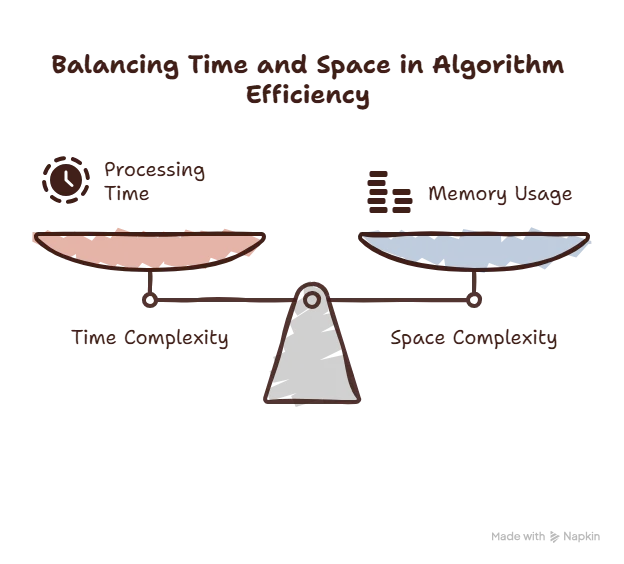
A single problem can often be solved using multiple different algorithms. Selecting the best algorithm depends on its efficiency, measured by two metrics:
- Time Complexity: The amount of computer processing time required to run the algorithm to completion.
- Space Complexity: The amount of computer memory (RAM) needed to execute the algorithm.
Coding & High-Level Languages (Introduction to Problem Solving Class 11)
Once an algorithm is verified, it is translated into a machine-readable format using a high-level programming language like Python, Java, or C++.
- Source Code & Syntax: Instructions are written according to the specific grammar and spelling rules (syntax) of the programming language.
- Translation: High-level code (source code) is portable and human-readable, but it must be translated into low-level machine language (0s and 1s) using a Compiler or Interpreter so the hardware can execute it.

Decomposition (Decomposition in problem solving)
Large software systems (such as a Railway Reservation System or Weather Forecasting System) are too complex to design all at once. Decomposition applies a “divide and conquer” approach to break a complex problem into smaller, independent sub-problems.
- Independent Execution: Sub-problems are easier to analyze, design, and code. Different modules can be assigned to specialized development teams simultaneously.
- Integration: After individual sub-modules are designed and tested, they are linked together logically to form the complete solution.

NCERT Solutions for Class 11 Computer Science Chapter 4 – Introduction to Problem Solving All Exercise Questions Answered
Activity Question Answer (Introduction to Problem Solving Class 11)
Activity 4.1 (Class 11 Computer Science Chapter 4 Notes)
What sequence of steps will you follow to compute the LCM of two numbers?
Answer: Algorithm to find LCM of two numbers
- Step 1: Input two numbers A and B.
- Step 2: Find the multiples of A.
- Step 3: Find the multiples of B.
- Step 4: Compare both lists of multiples.
- Step 5: Identify the smallest common multiple.
- Step 6: Display the smallest common multiple as the LCM.
Example:
A = 6, B = 8
Multiples of 6: 6, 12, 18, 24, 30, …
Multiples of 8: 8, 16, 24, 32, …
Smallest common multiple = 24
LCM = 24
Activity 4.2 (Introduction to Problem Solving Class 11)
Draw a flowchart that represents the attainment of your career goal?
Answer:

Think and Reflect (Introduction to Problem Solving Class 11)
What will happen if an algorithm does not stop after a finite number of steps?
Answer: If an algorithm never stops, it enters an infinite loop. The desired result will never be produced, and the computer will continue executing the same steps repeatedly, wasting time and resources.
Activity 4.3 (Introduction to Problem Solving Class 11)
Write a pseudocode for creating a scoreboard for a hockey match.
Answer:
INPUT TeamA_Name
INPUT TeamB_Name

SET TeamA_Score = 0
SET TeamB_Score = 0

WHILE Match_Not_Over

INPUT Goal_Team

IF Goal_Team = TeamA_Name THEN
    INCREMENT TeamA_Score
ELSE
    INCREMENT TeamB_Score
END IF

END WHILE

PRINT TeamA_Name, TeamA_Score
PRINT TeamB_Name, TeamB_Score

IF TeamA_Score > TeamB_Score THEN
PRINT TeamA_Name, "Wins"
ELSE IF TeamB_Score > TeamA_Score THEN
PRINT TeamB_Name, "Wins"
ELSE
PRINT "Match Drawn"
END IFThink and Reflect (Class 11 Computer Science Chapter 4 Notes)
Can you list some routine activities in your daily life where decision making is involved?
Answer: Some examples are:
- Deciding whether to carry an umbrella based on the weather.
- Choosing whether to walk or take a bus to school.
- Deciding what clothes to wear according to the season.
- Choosing which subject to study first.
- Deciding whether to play outside or stay indoors.
Think and Reflect (Introduction to Problem Solving Class 11)
Can you list some routine activities in your daily life where repetition or iteration is involved?
Answer:
- Brushing teeth several times every day.
- Walking a fixed number of steps during exercise.
- Practicing mathematics problems repeatedly.
- Watering plants every morning.
- Revising lessons before examinations.
Activity 4.4 (Introduction to Problem Solving Class 11)
Let us answer the following questions using the pesudocode given in example 4.9:
1. What will the sum when the input are 6,7,4,8,2,5,0,3,1.
Answer: According to the algorithm, when 0 is entered, the loop stops. Therefore, 3 and 1 are ignored.
Sum = 6 + 7 + 4 + 8 + 2 + 5
= 32
2. What will be the value of count?
Answer: The numbers considered are:
6, 7, 4, 8, 2, 5
Total numbers = 6
Count = 6
3. Why did we use the input statement to enter num twice?
Answer: The first input is used to start the process. The second input inside the loop is used to take the next number after processing the current one.
Without the second input, the same number would be processed repeatedly and the loop would never move to the next value.
4. Why did we divide sum by count?
Answer: Average is calculated using:
Average = Sum ÷ Number of values
Here:
Sum = total of all entered numbers
Count = number of entered numbers
Therefore, we divide sum by count to find the average.
5. Can there be any other approach?
Answer: Yes.
One alternative is to first ask the user how many numbers will be entered. Then use a loop exactly that many times and finally calculate the average.
Think and Reflect (Introduction to Problem Solving Class 11)
Why is verification of algorithm an important step in problem solving?
Answer: Verification helps us check whether the algorithm works correctly for different inputs. It helps identify mistakes, missing steps and logical errors before writing the final program. This saves time and ensures that the program produces correct results.
Activity 4.5 (NCERT Solutions for Class 11 Computer Science)
Write an algorithm to take as input the measurement of length and breadth in feet and inches of a rectangular shape and calculate its area and perimeter.
Answer: Algorithm
Step 1: Input length in feet (LF) and inches (LI).
Step 2: Input breadth in feet (BF) and inches (BI).
Step 3: Convert length into inches.
Length = (LF × 12) + LI
Step 4: Convert breadth into inches.
Breadth = (BF × 12) + BI
Step 5: Calculate Area.
Area = Length × Breadth
Step 6: Calculate Perimeter.
Perimeter = 2 × (Length + Breadth)
Step 7: Display Area.
Step 8: Display Perimeter.
Step 9: Stop.
Example:
Length = 5 ft 6 in
= (5 × 12) + 6
= 66 inches
Breadth = 4 ft 3 in
= (4 × 12) + 3
= 51 inches
Area = 66 × 51
= 3366 square inches
Perimeter = 2 × (66 + 51)
= 234 inches
Exercise (Introduction to Problem Solving Class 11)
1. Write pseudocode that reads two numbers and divide one by another and display the quotient.
Answer:
INPUT num1
INPUT num2

COMPUTE quotient = num1 / num2

PRINT quotientExplanation: The user enters two numbers. The first number is divided by the second number and the result (quotient) is displayed.
2. Two friends decide who gets the last slice of a cake by flipping a coin five times. The first person to win three flips wins the cake. An input of 1 means player 1 wins a flip, and a 2 means player 2 wins a flip. Design an algorithm to determine who takes the cake?
Answer:
SET P1 = 0
SET P2 = 0

REPEAT 5 TIMES

INPUT flip

IF flip = 1 THEN
P1 = P1 + 1
ELSE
P2 = P2 + 1
END IF

IF P1 = 3 THEN
PRINT "Player 1 wins the cake"
STOP
END IF

IF P2 = 3 THEN
PRINT "Player 2 wins the cake"
STOP
END IF

END REPEAT3. Write the pseudocode to print all multiples of 5 between 10 and 25 (including both 10 and 25).
Answer:
SET num = 10

WHILE num <= 25

    IF num MOD 5 = 0 THEN
        PRINT num
    END IF

    num = num + 1

END WHILEOutput:
10
15
20
254. Give an example of a loop that is to be executed a certain number of times.
Answer: Printing numbers from 1 to 10.
SET count = 1

WHILE count <= 10

    PRINT count

    count = count + 1

END WHILEExplanation: The loop runs exactly 10 times.
5. Suppose you are collecting money for something. You need ₹ 200 in all. You ask your parents, uncles and aunts as well as grandparents. Different people may give either ₹ 10, ₹ 20 or even ₹ 50. You will collect till the total becomes 200. Write the algorithm.
Answer: Money keeps getting added until the total reaches ₹200 or more.
SET total = 0

WHILE total < 200

    INPUT amount

    total = total + amount

END WHILE

PRINT "Target reached"
PRINT total6. Write the pseudocode to print the bill depending upon the price and quantity of an item. Also print Bill GST, which is the bill after adding 5% of tax in the total bill.
Answer: GST is 5% of the bill amount.
INPUT price
INPUT quantity

COMPUTE bill = price * quantity

COMPUTE gst = bill * 5 / 100

COMPUTE totalBill = bill + gst

PRINT bill
PRINT totalBill7. Write pseudocode that will perform the following:
- Read the marks of three subjects: Computer Science, Mathematics and Physics, out of 100
- Calculate the aggregate marks
- Calculate the percentage of marks
Answer:
INPUT CS
INPUT Maths
INPUT Physics

COMPUTE Aggregate = CS + Maths + Physics

COMPUTE Percentage = Aggregate / 3

PRINT Aggregate

PRINT PercentageExplaination: Since each subject is out of 100, the percentage is obtained by dividing total marks by 3.
8. Write an algorithm to find the greatest among two different numbers entered by the user.
Answer: The larger number is displayed.
INPUT num1
INPUT num2

IF num1 > num2 THEN
    PRINT num1
ELSE
    PRINT num2
END IF9. Write an algorithm that performs the following:
Ask a user to enter a number. If the number is between 5 and 15, write the word GREEN. If the number is between 15 and 25, write the word BLUE. if the number is between 25 and 35, write the word ORANGE. If it is any other number, write that ALL COLOURS ARE BEAUTIFUL.
Answer:
INPUT num

IF num >= 5 AND num < 15 THEN
    PRINT "GREEN"

ELSE IF num >= 15 AND num < 25 THEN
    PRINT "BLUE"

ELSE IF num >= 25 AND num < 35 THEN
    PRINT "ORANGE"

ELSE
    PRINT "ALL COLOURS ARE BEAUTIFUL"

END IF10. Write an algorithm that accepts four numbers as input and find the largest and smallest of them.
Answer:
INPUT A
INPUT B
INPUT C
INPUT D

SET Largest = A
SET Smallest = A

IF B > Largest THEN
    Largest = B
END IF

IF C > Largest THEN
    Largest = C
END IF

IF D > Largest THEN
    Largest = D
END IF

IF B < Smallest THEN
    Smallest = B
END IF

IF C < Smallest THEN
    Smallest = C
END IF

IF D < Smallest THEN
    Smallest = D
END IF

PRINT Largest
PRINT Smallest11. Write an algorithm to display the total water bill charges of the month depending upon the number of units consumed by the customer as per the following criteria:
- for the first 100 units @ 5 per unit
- for next 150 units @ 10 per unit
- more than 250 units @ 20 per unit
Also add meter charges of 75 per month to calculate the total water bill .
Answer:
INPUT units

IF units <= 100 THEN

    bill = units * 5

ELSE IF units <= 250 THEN

    bill = (100 * 5) + ((units - 100) * 10)

ELSE

    bill = (100 * 5) + (150 * 10)
           + ((units - 250) * 20)

END IF

totalBill = bill + 75

PRINT totalBillExample:
Units = 300
First 100 units = 100 × 5 = ₹500
Next 150 units = 150 × 10 = ₹1500
Remaining 50 units = 50 × 20 = ₹1000
Water charge = ₹3000
Meter charge = ₹75
Total Bill = ₹3075
12. What are conditionals? When they are required in a program?
Answer: Conditionals are statements used to make decisions in a program. They check whether a condition is true or false and perform actions accordingly.
Examples: IF, IF-ELSE
They are required whenever different actions are needed for different situations.
Example:
- Voting eligibility
- Odd or even number
- Pass or fail result
13. Match the pairs


Answer:

14. Following is an algorithm for going to school or college. Can you suggest improvements in this to include other options?
Reach_School_Algorithm
- Wake up
- Get ready
- Take lunch box
- Take bus
- Get off the bus
- Reach school or college
Answer:
Wake up

Get ready

Take lunch box

IF school bus available THEN

    Take bus

ELSE IF bicycle available THEN

    Ride bicycle

ELSE

    Walk to school

END IF

Reach schoolImprovement: The algorithm now includes alternative ways of travelling.
15. Write a pseudocode to calculate the factorial of a number ( Hint: Factorial of 5, written as 5! = (5 X 4 X 3 X 2 X 1)
Answer: Pseudocode
INPUT N

SET Fact = 1

WHILE N > 0

    Fact = Fact * N

    N = N - 1

END WHILE

PRINT FactExample: 5! = 5 × 4 × 3 × 2 × 1 = 120
16. Draw a flowchart to check whether a given number is an Armstrong number. An Armstrong number of three digits is an integer such that the sum of the cubes of its digits is equal to the number itself. For example, 371 is an Armstrong number since 3**3 + 73 + 13 = 371.
Answer:

INPUT num

SET temp = num
SET sum = 0

WHILE temp > 0

    digit = temp MOD 10

    sum = sum + digit*digit*digit

    temp = temp DIV 10

END WHILE

IF sum = num THEN

    PRINT "Armstrong Number"

ELSE

    PRINT "Not Armstrong Number"

END IFExample:
371
= 3³ + 7³ + 1³
= 27 + 343 + 1
= 371
Therefore, 371 is an Armstrong Number.
17. Following is an algorithm to classify numbers as “Single Digit”, “Double Digit” or “Big”.
Classify_Numbers_Algo
INPUT Number
IF Number < 9
“Single Digit”
Else If Number < 99
“Double Digit”
Else
“Big”
Verify for (5, 9, 47, 99, 100 200) and correct the algorithm if required
Answer:

Correct Algorithm:
INPUT Number

IF Number <= 9 THEN

    PRINT "Single Digit"

ELSE IF Number <= 99 THEN

    PRINT "Double Digit"

ELSE

    PRINT "Big"

END IF18. For some calculations, we want an algorithm that accepts only positive integers upto 100.
Accept_1to100_Algo
INPUT Number
IF (0<= Number) AND (Number <= 100)
ACCEPT
Else
REJECT
- On what values will this algorithm fail?
- Can you improve the algorithm?
Answer:
(a) On what values will this algorithm fail?
The algorithm accepts 0, but the question says positive integers. Since 0 is not positive, the algorithm fails for: 0
(b) Improved Algorithm
INPUT Number

IF (Number > 0) AND (Number <= 100) THEN

    ACCEPT

ELSE

    REJECT

END IFExplanation: Now only numbers from 1 to 100 are accepted, which satisfies the condition of positive integers.