

Welcome to the ultimate step-by-step guide on Flow of Control in Python Class 11! If you are a Class 11 Computer Science or Informatics Practices student, this chapter forms the entire bedrock of your programming logic.
Until now, you might have written simple sequential programs where code executes strictly from top to bottom, line by line. But real-world applications don’t work like that-they make decisions, repeat tasks, and skip unnecessary steps. In this guide, we (ThinkSphereEdu.com) will break down every single concept, code snippet, flowchart, and logic block covered in Chapter 6.
- 1. Introduction to Flow of Control (Flow of Control in Python Class 11)
- 2. Selection Constructs (Decision Making) (Class 11 Computer Science Chapter 6)
- 3. Indentation in Python (Python control statements class 11)
- 4. Repetition Constructs (Loops / Iteration) (Python selection and repetition)
- 5. Jump Statements (break & continue) (Python control statements class 11)
- 6. Nested Loops (Python selection and repetition)
- 7. Solved Chapter Exercises & NCERT Solutions (Flow of Control in Python Class 11)
- Programming Exercises (Flow of Control in Python Class 11)
- Case Study-Based Question (SMIS) (Flow of Control in Python Class 11)
CBSE | Flow of Control in Python Class 11 Notes: Complete CBSE Chapter 6 Guide
1. Introduction to Flow of Control (Flow of Control in Python Class 11)
When you write a Python script, execution usually starts at the first line and moves downward sequentially.
What is Sequential Execution?
Imagine a school bus driving along a single, straight road from home to school. The driver cannot jump ahead or take detours; they must cross one milestone after another in exact order.
In programming, this default top-to-bottom movement is known as sequential execution.
Code Example: Sequential Execution
# Program to calculate difference of two numbers sequentially
num1 = int(input("Enter first number: "))
num2 = int(input("Enter second number: "))

diff = num1 - num2
print("The difference of", num1, "and", num2, "is", diff)Output
Enter first number: 5
Enter second number: 7
The difference of 5 and 7 is -2In the example above, Python executes each line sequentially. But notice the output: the difference is -2. What if we wanted to always subtract the smaller number from the larger number so the result is always positive? A simple top-to-bottom program cannot handle that without making a choice.
What is Control Flow? (Flow of Control in Python Class 11)
The order in which statements are executed inside a program is known as the flow of control. To change the default top-to-bottom flow, Python uses control structures.
Python supports two primary types of control structures:
- Selection (Decision Making): Choosing one path out of multiple options based on a condition.
- Repetition (Iteration/Looping): Executing a set of instructions repeatedly as long as a condition holds true.
2. Selection Constructs (Decision Making) (Class 11 Computer Science Chapter 6)
In real life, you make decisions constantly:
- If you have ₹10, you buy a specific pen.
- If the traffic signal is red, you STOP; else if it is orange, you BE SLOW; else, you GO.
In Python, decision making is implemented using if, if..else, and if..elif..else statements.

2.1 The if Statement (if else statement in Python)
The if statement is the simplest decision-making construct. It executes a block of code only if its test condition evaluates to True. If the condition is False, the code block is ignored.
if condition:
statement(s)Example: Voting Eligibility
age = int(input("Enter your age: "))

if age >= 18:
print("Eligible to vote")- If you enter
20, the condition20 >= 18isTrue, so"Eligible to vote"is printed. - If you enter
15, nothing prints because there is no alternative path specified.
2.2 The if..else Statement (if else statement in Python)
When you have two clear alternative paths (one for True, one for False), use if..else.
if condition:
statement_block_1
else:
statement_block_2Example 1: Voting Eligibility with Alternative
age = int(input("Enter your age: "))

if age >= 18:
    print("Eligible to vote")
else:
print("Not eligible to vote")Example 1: Positive Difference of Two Numbers
Now let’s fix our initial difference program so it always outputs a positive number.
num1 = int(input("Enter first number: "))
num2 = int(input("Enter second number: "))

if num1 > num2:
    diff = num1 - num2
else:
    diff = num2 - num1

print("The difference of", num1, "and", num2, "is", diff)Output:
Enter first number: 5
Enter second number: 6
The difference of 5 and 6 is 12.3 The if..elif..else Statement (if else statement in Python)
When you need to test multiple conditions sequentially, chain them using elif (short for else if).

Syntax:
if condition_1:
    block_1
elif condition_2:
    block_2
elif condition_3:
    block_3
else:
fallback_blockExample 1: Checking Number Sign
number = int(input("Enter a number: "))

if number > 0:
    print("Number is positive")
elif number < 0:
    print("Number is negative")
else:
print("Number is zero")Example 2: Traffic Light Indicator
signal = input("Enter the colour: ")

if signal == "red" or signal == "RED":
    print("STOP")
elif signal == "orange" or signal == "ORANGE":
    print("Be Slow")
elif signal == "green" or signal == "GREEN":
    print("Go!")
else:
print("Invalid signal colour!")2.4 Nested if Statements (if else statement in Python)
An if or if..else block placed inside another if or elif block is called a nested if statement.
Example: Simple Four Function Calculator
result = 0
val1 = float(input("Enter value 1: "))
val2 = float(input("Enter value 2: "))
op = input("Enter any one of the operator (+, -, *, /): ")

if op == "+":
    result = val1 + val2
elif op == "-":
    # Nested if-else to guarantee a positive difference
    if val1 > val2:
        result = val1 - val2
    else:
        result = val2 - val1
elif op == "*":
    result = val1 * val2
elif op == "/":
    # Nested if-else to prevent Division by Zero
    if val2 == 0:
        print("Error! Division by zero is not allowed. Program terminated.")
    else:
        result = val1 / val2
else:
    print("Wrong input, program terminated")

print("The result is", result)3. Indentation in Python (Python control statements class 11)
Unlike languages like C, C++, or Java that use curly braces {} to group code into blocks, Python uses indentation (leading whitespace/tabs).
Guido van Rossum (creator of Python) made indentation part of Python syntax to ensure all code remains clean and readable.
if num1 > num2:
print("first number is larger") # <--- Indented (Block 1)
print("Bye") # <--- Indented (Block 1)
else:
print("second number is larger") # <--- Indented (Block 2)
print("Bye Bye") # <--- Indented (Block 2)Key Rules for Python Indentation:
- All statements inside the same block must have the exact same indentation level.
- Standard practice is to use 4 spaces or 1 tab per indentation level.
- Mixing tabs and spaces in the same file will raise an
IndentationError.
4. Repetition Constructs (Loops / Iteration) (Python selection and repetition)
In programming, when you need to repeat a task multiple times, you use loops (iterative statements).
Consider nature: a butterfly lays eggs –> caterpillar –> pupa –> butterfly –> lays eggs. This cycle repeats continuously.
If you were asked to print numbers from 1 to 5, you could write 5 print() statements. But what if you needed to print numbers from 1 to 100,000? Writing 100,000 print lines is impossible. Loops automate this repetition cleanly.
Python provides two primary looping constructs:
- The
forLoop - The
whileLoop
4.1 The for Loop (Python selection and repetition)
The for loop is used to iterate over a range of numbers or any sequence (like strings, lists, or tuples). Use a for loop when the number of iterations is known in advance.

Syntax:
for control_variable in sequence:
statement(s)Example 1: Iterating Over a String
for letter in 'PYTHON':
print(letter)Output:
P
Y
T
H
O
NExample 2: Iterating Over a List
count = [10, 20, 30, 40, 50]
for num in count:
print(num)Example 3: Filtering Even Numbers from a List
numbers = [1, 2, 3, 4, 5, 6, 7, 8, 9, 10]
for num in numbers:
    if num % 2 == 0:
print(num, "is an even Number")4.2 The range() Function (Flow of Control in Python Class 11)
The built-in range() function generates a sequence of integers and is commonly used with for loops.
Syntax:
range([start], stop[, step])start(optional): Starting integer. Defaults to0.stop(mandatory): Sequence generates up tostop - 1(stop value is excluded).step(optional): Incremental/decremental step value. Defaults to1.
Important Note: All parameters passed to range() must be integers.
Examples of range():
list(range(5))–>[0, 1, 2, 3, 4]list(range(2, 10))–>[2, 3, 4, 5, 6, 7, 8, 9]list(range(0, 30, 5))–>[0, 5, 10, 15, 20, 25]list(range(0, -9, -1))–> [0, -1, -2, -3, -4, -5, -6, -7, -8]
Example Program: Multiples of 10
for num in range(5):
    if num > 0:
print(num * 10)Output:
10
20
30
404.2 The while Loop (Python selection and repetition)
The while loop executes code repeatedly as long as a entry test condition remains True. The condition is evaluated before entering the body.

Syntax:
while test_condition:
body_of_whileExample 1: Printing First 5 Natural Numbers
count = 1
while count <= 5:
    print(count)
count += 1 # Crucial: update step to prevent infinite loopExample 2: Finding Factors of a Number
num = int(input("Enter a number to find its factors: "))
print(1, end=' ')  # 1 is always a factor

factor = 2
while factor <= num / 2:
    if num % factor == 0:
        print(factor, end=' ')
    factor += 1

print(num, end=' ') # A number is always a factor of itselfOutput:
Enter a number to find its factors: 6
1 2 3 6Comparison: for Loop vs. while Loop

5. Jump Statements (break & continue) (Python control statements class 11)
Sometimes you need to alter normal loop flow mid-execution. Python provides jump statements to break or skip iterations dynamically.
5.1 The break Statement (Python control statements class 11)
The break statement immediately terminates the loop and shifts control to the line following the loop.

Example 1: Premature Loop Exit
for num in range(10):
    num = num + 1
    if num == 8:
        break
    print("Num has value " + str(num))

print("Encountered break!! Out of loop")Output:
Num has value 1
Num has value 2
Num has value 3
Num has value 4
Num has value 5
Num has value 6
Num has value 7
Encountered break!! Out of loopExample 2: Summing Numbers Until Negative Input
sum1 = 0
print("Enter numbers to find their sum (negative number stops input):")

while True:
    entry = int(input())
    if entry < 0:
        break
    sum1 += entry

print("Sum =", sum1)Example 3: Checking Prime Numbers
num = int(input("Enter the number to be checked: "))
flag = 0

if num > 1:
    for i in range(2, int(num / 2) + 1):
        if num % i == 0:
            flag = 1
            break  # Factor found, stop checking further!

    if flag == 1:
        print(num, "is not a prime number")
    else:
        print(num, "is a prime number")
else:
print("Entered number is <= 1, execute again!")5.2 The continue Statement (Python control statements class 11)
The continue statement skips the rest of the current iteration and jumps directly to the beginning of the next iteration.

Example: Skipping Specific Iterations
for num in range(6):
    num = num + 1
    if num == 3:
        continue  # Skip printing when num is 3
    print("Num has value " + str(num))

print("End of loop")Output:
Num has value 1
Num has value 2
Num has value 4
Num has value 5
Num has value 6
End of loop6. Nested Loops (Python selection and repetition)
A loop placed inside another loop is called a nested loop. The inner loop completes all its iterations for every single iteration of the outer loop.
6.1 Basic Nested Loop Mechanics (Class 11 Computer Science Chapter 6)
for var1 in range(3):  # Outer loop runs 3 times
    print("Iteration " + str(var1 + 1) + " of outer loop")
    for var2 in range(2):  # Inner loop runs 2 times per outer loop
        print(var2 + 1)
    print("Out of inner loop")

print("Out of outer loop")6.2 Pattern Printing Using Nested Loops
Nested loops are commonly used for matrix operations and visual patterns.
num = int(input("Enter a number to generate its pattern: "))

for i in range(1, num + 1):
    for j in range(1, i + 1):
        print(j, end=" ")
print() # Move to next lineOutput: (for input = 5)
1
1 2
1 2 3
1 2 3 4
1 2 3 4 56.3 Prime Numbers Between 2 and 50 (Class 11 Computer Science Chapter 6)
for i in range(2, 50):
    j = 2
    is_prime = True
    while j <= (i / 2):
        if i % j == 0:
            is_prime = False
            break
        j += 1
    if is_prime:
        print(i, "is a prime number")

print("Bye Bye!!")7. Solved Chapter Exercises & NCERT Solutions (Flow of Control in Python Class 11)
Q1. What is the difference between else and elif construct of if statement?
Answer:
elif(Else-If): Used when you have multiple conditions to check sequentially. Python evaluates anelifcondition only if all precedingiforelifconditions evaluated toFalse. It requires an explicit conditional expression (e.g.,elif x > 5:).
else: Acts as a default fallback block. It executes if all precedingifandelifconditions evaluate toFalse. It does not take any conditional expression.
Q2. What is the purpose of range() function? Give one example.
Answer:
The built-in range() function generates a sequence of integers from a given start value up to a stop value (excluding the stop value) with a specified step interval. It is primarily used with for loops to control the number of iterations.
Syntax: range([start], stop[, step])
Example:
# Generates numbers from 1 to 4 with a step of 1
for i in range(1, 5):
print(i)Output:
1
2
3
4Q3. Differentiate between break and continue statements using examples.
Answer:
breakStatement: Immediately terminates the current loop entirely and transfers program control to the statement following the loop.
continueStatement: Skips the remaining statements in the body of the loop for the current iteration and jumps directly to the beginning of the loop for the next iteration.
Example Comparison:
# Demonstrating break
for i in range(1, 6):
    if i == 3:
        break
    print(i, end=" ")
# Output: 1 2

print()

# Demonstrating continue
for i in range(1, 6):
    if i == 3:
        continue
    print(i, end=" ")
# Output: 1 2 4 5Q4. What is an infinite loop? Give one example.
Answer:
An infinite loop is a looping construct where the test condition never evaluates to False. As a result, the loop executes endlessly until the program is forcefully interrupted.
Example:
count = 1
while count <= 5:
    print("Infinite Loop!")
# Forgot to increment count (count += 1 is missing), so count stays 1 foreverQ5. Find the output of the following program segments:
(i)
a = 110
while a > 100:
    print(a)
a -= 2Explanation:
a starts at 110. The loop continues as long as a > 100. In each iteration, a decreases by 2.
Output:
110
108
106
104
102(ii)
for i in range(20, 30, 2):
print(i)Explanation:
range(20, 30, 2) generates sequence starting at 20 up to 28 (excluding 30) with step 2.
Output:
20
22
24
26
28(iii)
country = 'INDIA'
for i in country:
print(i)Explanation:
The for loop iterates through each character of the string 'INDIA' and prints it on a new line
Output:
I
N
D
I
A(iv)
i = 0; sum = 0
while i < 9:
    if i % 4 == 0:
        sum = sum + i
    i = i + 2
print(sum)Step-by-step Execution:
i = 0:0 % 4 == 0–> True –>sum = 0 + 0 = 0,ibecomes2.i = 2:2 % 4 == 0–> False –>sumremains0,ibecomes4.i = 4:4 % 4 == 0–> True –>sum = 0 + 4 = 4,ibecomes6.i = 6:6 % 4 == 0–> False –>sumremains4,ibecomes8.i = 8:8 % 4 == 0–> True –>sum = 4 + 8 = 12,ibecomes10.i = 10:10 < 9is False –> Loop terminates.
Output:
12(v)
for x in range(1, 4):
    for y in range(2, 5):
        if x * y > 10:
            break
print(x * y)Step-by-step Execution:
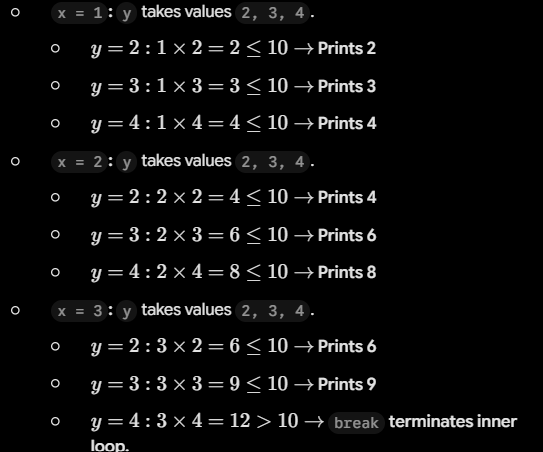
Output:
2
3
4
4
6
8
6
9(vi)
var = 7
while var > 0:
    print('Current variable value: ', var)
    var = var - 1
    if var == 3:
        break
    else:
        if var == 6:
            var = var - 1
            continue
print("Good bye!")Step-by-step Execution:
var = 7: PrintsCurrent variable value: 7.varbecomes6.var == 6is True –>varbecomes5,continuejumps to top.var = 5: PrintsCurrent variable value: 5.varbecomes4.if/elsechecks fail.var = 4: PrintsCurrent variable value: 4.varbecomes3.var == 3is True –>breakexecutes!- Loop breaks, executes final print.
Output:
Current variable value:  7
Current variable value:  5
Current variable value:  4
Good bye!Programming Exercises (Flow of Control in Python Class 11)
1. Write a program that takes the name and age of the user as input and displays a message whether the user is eligible to apply for a driving license or not. (the eligible age is 18 years).
Answer:
name = input("Enter your name: ")
age = int(input("Enter your age: "))

if age >= 18:
    print(f"Hello {name}, you are eligible to apply for a driving license.")
else:
print(f"Sorry {name}, you are not eligible to apply for a driving license yet.")Output:
Enter your name: Rahul
Enter your age: 19
Hello Rahul, you are eligible to apply for a driving license.2. Write a function to print the table of a given number. The number has to be entered by the user.
Answer:
def print_table(num):
    print(f"Multiplication Table for {num}:")
    for i in range(1, 11):
        print(f"{num} x {i} = {num * i}")

user_num = int(input("Enter a number to print its table: "))
print_table(user_num)Output:
Enter a number to print its table: 7
Multiplication Table for 7:
7 x 1 = 7
7 x 2 = 14
7 x 3 = 21
7 x 4 = 28
7 x 5 = 35
7 x 6 = 42
7 x 7 = 49
7 x 8 = 56
7 x 9 = 63
7 x 10 = 703. Write a program that prints minimum and maximum of five numbers entered by the user.
Answer:
numbers = []
for i in range(1, 6):
    num = float(input(f"Enter number {i}: "))
    numbers.append(num)

minimum = min(numbers)
maximum = max(numbers)

print(f"Minimum value entered: {minimum}")
print(f"Maximum value entered: {maximum}")Output:
Enter number 1: 45
Enter number 2: 12
Enter number 3: 89
Enter number 4: 3
Enter number 5: 67
Minimum value entered: 3.0
Maximum value entered: 89.04. Write a program to check if the year entered by the user is a leap year or not.
Answer:
year = int(input("Enter a year: "))

if (year % 400 == 0) or (year % 4 == 0 and year % 100 != 0):
    print(f"{year} is a Leap Year.")
else:
print(f"{year} is NOT a Leap Year.")Output:
Enter a year: 2024
2024 is a Leap Year.5. Write a program to generate the sequence: –5, 10, –15, 20, –25….. upto n, where n is an integer input by the user.
Answer:
n = int(input("Enter the number of terms (n): "))

for i in range(1, n + 1):
    term = 5 * i
    if i % 2 != 0:
        term = -term  # Odd terms are negative
print(term, end=", " if i < n else "\n")Output:
Enter the number of terms (n): 6
-5, 10, -15, 20, -25, 306. Write a program to find the sum of 1+ 1/8 + 1/27……1/n3, where n is the number input by the user.
Answer:
n = int(input("Enter value of n: "))
series_sum = 0.0

for i in range(1, n + 1):
    series_sum += 1 / (i ** 3)

print(f"The sum of the series up to term {n} is: {series_sum:.6f}")Output:
Enter value of n: 4
The sum of the series up to term 4 is: 1.1773157. Write a program to find the sum of digits of an integer number, input by the user.
Answer:
num = int(input("Enter an integer number: "))
temp = abs(num)  # Handle negative inputs gracefully
digit_sum = 0

while temp > 0:
    digit = temp % 10
    digit_sum += digit
    temp //= 10

print(f"The sum of digits of {num} is: {digit_sum}")Output:
Enter an integer number: 4521
The sum of digits of 4521 is: 128. Write a function that checks whether an input number is a palindrome or not.
Answer:
def is_palindrome(value):
    val_str = str(value)
    return val_str == val_str[::-1]

user_input = input("Enter a number or string to check: ")

if is_palindrome(user_input):
    print(f"'{user_input}' is a Palindrome.")
else:
print(f"'{user_input}' is NOT a Palindrome.")Output:
Enter a number or string to check: 12321
'12321' is a Palindrome.

Enter a number or string to check: python
'python' is NOT a Palindrome.9. Write a program to print the following patterns:
(i) Diamond Star Pattern:
n = 3  # Upper half height

# Upper half including middle row
for i in range(1, n + 1):
    print(" " * (n - i) + "*" * (2 * i - 1))

# Lower half
for i in range(n - 1, 0, -1):
print(" " * (n - i) + "*" * (2 * i - 1))Output:
  *
 ***
*****
 ***
*(ii) Palindrome Pyramid:
n = 5
for i in range(1, n + 1):
    print(" " * (n - i) * 2, end="")
    # Decreasing sequence
    for j in range(i, 0, -1):
        print(j, end=" ")
    # Increasing sequence
    for j in range(2, i + 1):
        print(j, end=" ")
print()Output:
        1
      2 1 2
    3 2 1 2 3
  4 3 2 1 2 3 4
5 4 3 2 1 2 3 4 5(iii) Inverted Right Triangle:
for i in range(5, 0, -1):
    print(" " * (5 - i), end="")
    for j in range(1, i + 1):
        print(j, end="")
print()Output:
12345
 1234
  123
   12
1(iii) Hollow Diamond Star Pattern:
n = 3

# Upper Half
for i in range(1, n + 1):
    for j in range(1, n - i + 1):
        print(" ", end="")
    for j in range(1, 2 * i):
        if j == 1 or j == 2 * i - 1:
            print("*", end="")
        else:
            print(" ", end="")
    print()

# Lower Half
for i in range(n - 1, 0, -1):
    for j in range(1, n - i + 1):
        print(" ", end="")
    for j in range(1, 2 * i):
        if j == 1 or j == 2 * i - 1:
            print("*", end="")
        else:
            print(" ", end="")
print()Output:
  *
 * *
*   *
 * *
*10. Write a program to find the grade of a student when grades are allocated as given in the table below.

Percentage of the marks obtained by the student is input to the program.
Answer:
percentage = float(input("Enter percentage obtained by student: "))

if percentage > 90:
    grade = "A"
elif percentage >= 80:
    grade = "B"
elif percentage >= 70:
    grade = "C"
elif percentage >= 60:
    grade = "D"
else:
    grade = "E"

print(f"Allocated Grade: {grade}")Output:
Enter percentage obtained by student: 84.5
Allocated Grade: B

Enter percentage obtained by student: 92
Allocated Grade: ACase Study-Based Question (SMIS) (Flow of Control in Python Class 11)
Let us add more functionality to our SMIS developed in Chapter 5.
6.1 Write a menu driven program that has options to
- accept the marks of the student in five major subjects in Class X and display the same.
- calculate the sum of the marks of all subjects. Divide the total marks by number of subjects (i.e. 5), calculate percentage = total marks/5 and display the percentage.
- Find the grade of the student as per the following criteria:

Answer:
# Student Management Information System (SMIS) - Menu Driven Module[cite: 1]

def display_menu():
    print("\n" + "="*35)
    print("      STUDENT MARKS SYSTEM      ")
    print("="*35)
    print("1. Enter Marks & Calculate Results")
    print("2. Exit")
    print("="*35)

while True:
    display_menu()
    choice = input("Enter your choice (1-2): ")

    if choice == '1':
        print("\nEnter marks for 5 major subjects (out of 100):")
        marks = []
        for i in range(1, 6):
            m = float(input(f"Subject {i}: "))
            marks.append(m)

        total_marks = sum(marks)
        percentage = total_marks / 5.0

        # Grade Criteria according to Chapter 6 Case Study[cite: 1]
        if percentage > 85:
            grade = 'A'
        elif percentage >= 75:
            grade = 'B'
        elif percentage >= 50:
            grade = 'C'
        elif percentage > 30:
            grade = 'D'
        else:
            grade = 'Reappear'

        print("\n" + "-"*30)
        print(f"Total Marks Obtained: {total_marks:.2f} / 500")
        print(f"Percentage          : {percentage:.2f}%")
        print(f"Final Grade         : {grade}")
        print("-" * 30)

    elif choice == '2':
        print("Exiting SMIS Module. Goodbye!")
        break
    else:
print("Invalid Choice! Please enter 1 or 2.")Output:
===================================
      STUDENT MARKS SYSTEM
===================================
1. Enter Marks & Calculate Results
2. Exit
===================================
Enter your choice (1-2): 1

Enter marks for 5 major subjects (out of 100):
Subject 1: 82
Subject 2: 78
Subject 3: 85
Subject 4: 70
Subject 5: 80

------------------------------
Total Marks Obtained: 395.00 / 500
Percentage          : 79.00%
Final Grade         : B
------------------------------

===================================
      STUDENT MARKS SYSTEM
===================================
1. Enter Marks & Calculate Results
2. Exit
===================================
Enter your choice (1-2): 2
Exiting SMIS Module. Goodbye!