

Welcome to the ultimate step-by-step guide on Getting Started with Python Class 11 Notes: Computer Science Notes! If you have just entered Class 11 and feel intimidated by coding, don’t worry-you are in the right place. In this detailed chapter breakdown, we will cover all core concepts from the Python basics Class 11 NCERT curriculum.
We will start with high-level languages and interpreters, move to fundamental building blocks like Python keywords and identifiers, and explore memory management with mutable and immutable data types in Python.
You will also master arithmetic, relational, and logical Python operators and precedence, understand how Python handles data changes through explicit and implicit type conversion in Python, and learn how to fix bugs using Python debugging runtime errors techniques. By the end of this lesson, you will be writing clean, efficient Python programs with complete confidence!
- 1. Introduction to Programming Languages & Python
- 2. Key Features of Python & Execution Modes (Getting Started with Python Class 11 Notes)
- 3. Python Keywords and Identifiers (Getting Started with Python Class 11 Notes)
- 4. Variables, Memory Allocation & Python’s Object Model
- 5. Comments in Python (Python basics Class 11 NCERT)
- 6. Comprehensive Data Types in Python
- 7. Mutable vs. Immutable Data Types (Getting Started with Python Class 11 Notes)
- 8. Operators in Python (Getting Started with Python Class 11 Notes)
- 9. Expressions and Precedence of Operators
- 10. Input and Output Statements (Getting Started with Python Class 11 Notes)
- 11. Type Conversion (Type Casting) (Python basics Class 11 NCERT)
- 12. Program Errors and Debugging (Python basics Class 11 NCERT)
- 12. Chapter Summary & Quick Revision Key Points
CBSE | Getting Started with Python Class 11 Notes with Solved Examples
1. Introduction to Programming Languages & Python
Before we start typing code, we must understand how a computer thinks and processes instructions.
What is a Computer Program?
A computer cannot act on its own intuition. It requires precise instructions.
- Program: An ordered set of instructions executed by a computer to perform a specific task.
- Programming Language: A formal language used to specify these instructions to the computer.
Low-Level vs. High-Level Languages
Computers natively understand only Machine Language (Low-Level Language), consisting entirely of 0s and 1s (binary code). Writing programs in binary is tedious and prone to human error.
To overcome this, High-Level Languages (HLL) like Python, C++, and Java were created. They use English-like words, making code easier to write, read, and maintain.

Translators: Interpreters vs. Compilers
Since computers cannot execute high-level source code directly, a translator is required:

2. Key Features of Python & Execution Modes (Getting Started with Python Class 11 Notes)
Python is one of the most versatile and beginner-friendly languages in the world.
Key Features of Python
- Free & Open Source: Available to download without licensing fees from
python.org.
- Interpreted Language: Code is executed line-by-line via the Python Interpreter.
- Easy Syntax & Readability: Clean structure that reads almost like plain English.
- Case-Sensitive: Identifier names treat uppercase and lowercase letters differently (e.g.,
NUMBERandnumberare distinct variables).
- Portable & Cross-Platform: Runs seamlessly on Windows, macOS, and Linux.
- Rich Standard Library: Built-in tools for math, file handling, web development, and data analysis.
- Indentation-Based: Uses whitespace indentation instead of curly braces
{}to define code blocks.
Python Execution Modes
Python programs can be run using two primary modes within the Python Shell/IDLE:

A. Interactive Mode (Getting Started with Python Class 11 Notes)
- How it works: Open the Python Shell where you see the primary prompt
>>>. Type a single command and press Enter for immediate execution.
- Best for: Quick testing and simple math evaluations.
- Limitation: Statements are not saved. Once the shell closes, your code is lost.
>>> 15 + 25
40
>>> "Class 11 " + "Computer Science"
'Class 11 Computer Science'B. Script Mode (Getting Started with Python Class 11 Notes)
- How it works: Open a new editor file (
File -> New File), write multiple lines of code, save the file with a.pyextension (e.g.,my_program.py), and run it (Run -> Run Moduleor press F5).
- Best for: Writing multi-line algorithms, complete applications, and saving code for future use.
# Script Mode Example: prog1.py
print("Welcome to Class 11 Computer Science!")
print("Learning Python is fun!")3. Python Keywords and Identifiers (Getting Started with Python Class 11 Notes)
Every programming language has strict vocabulary rules.
Python Keywords (Python keywords and identifiers)
Keywords are reserved words that carry special meaning to the Python interpreter. You cannot use reserved keywords as names for variables, functions, or objects.

Identifiers
Identifiers are custom names given to variables, functions, classes, or modules.
Rules for Naming Identifiers
- Must begin with an alphabet (
a-z,A-Z) or an underscore_. - Can be followed by alphabets, digits (
0-9), or underscores_. - Must NOT start with a digit (e.g.,
1stStudentis invalid). - Must NOT be a Python keyword.
- Must NOT contain special characters/symbols (
!,@,#,$,%, etc.). - Can be of any length.
Identifier Validation Examples:
- Valid:
student_name,marks1,_total,avgScore
- Invalid:
1stRank(starts with digit),total-marks(contains hyphen),class(reserved keyword),user@id(contains special character)
4. Variables, Memory Allocation & Python’s Object Model
What is a Variable? (Python basics Class 11 NCERT)
In Python, variables do not store values directly like traditional physical boxes. Instead, variables act as named references or pointers to objects stored in memory.
# Variable Assignment Syntax
variable_name = valueImplicit Declaration (Python basics Class 11 NCERT)
Unlike C++ or Java, Python does not require explicit data type declarations. A variable is automatically declared and typed the moment you assign a value to it.
student_age = 17       # Automatically created as an integer
student_name = "Amit" # Automatically created as a stringPython’s Object Architecture & id() Function
Every value in Python is treated as an object. Each object is assigned a unique memory address identifier (ID) during its lifetime. We inspect this address using the built-in id() function.
>>> num1 = 300
>>> id(num1)
140294829104
>>> num2 = num1
>>> id(num2)
140294829104
When num2 = num1 is executed, Python does not create a duplicate copy of 300 in memory. Instead, it routes num2 to reference the exact same memory address as num1.
If we update num1:
>>> num1 = num1 + 100
>>> id(num1)
140294829890num1 now points to a completely new object (400) at a new memory address, while num2 continues referencing 300 at address 140294829104.
5. Comments in Python (Python basics Class 11 NCERT)
Comments are notes added to code for explanation and readability. The Python interpreter completely ignores comments during execution.
Types of Comments
1. Single-line Comments: Use the hash symbol #.
# Calculate total marks
total = math_score + cs_score # Adding subject scores2. Multi-line Comments: Use multiple single-line # tags or triple-quoted strings (''' or """).
# This program calculates
# the simple interest for
# a given principal amount.6. Comprehensive Data Types in Python
Data types determine what kind of value a variable holds and what mathematical or logical operations can be performed on it.

1. Numbers
Stores numerical values only.
- Integer (
int): Whole numbers without decimals (e.g.,-15,0,450).
- Boolean (
bool): Subtype of integer consisting ofTrue(non-zero/1) andFalse(0).
- Floating-point (
float): Real numbers with decimal points or exponential notations (e.g.,3.14159,-0.005,1.5e3).
- Complex (
complex): Numbers in the form a + bj, where a is real and b is imaginary (e.g.,3 + 4j).
x = 100        # <class 'int'>
y = 45.8       # <class 'float'>
z = 2 + 3j     # <class 'complex'>
is_valid = True # <class 'bool'>2. Sequences
An ordered collection of items where each element is indexed by an integer (starting at index 0).
A. Strings (str)
An immutable collection of characters enclosed in single ('...') or double ("...") quotes.
school = "Kendriya Vidyalaya"B. Lists (list)
An ordered, mutable sequence of comma-separated items enclosed inside square brackets []. Can store mixed data types.
student_data = [101, "Rohan", 95.5, "Class 11"]C. Tuples (tuple)
An ordered, immutable sequence of items enclosed inside parentheses (). Once created, items cannot be modified, added, or removed.
months = ("Jan", "Feb", "Mar", "Apr")3. Sets (set)
An unordered collection of unique elements enclosed inside curly braces {}. Duplicate elements are automatically eliminated.
numbers = {1, 2, 2, 3, 4, 4}
print(numbers) # Output: {1, 2, 3, 4}4. None (NoneType)
A special constant used to signal the absence of a value or null status. It is not equivalent to 0 or False.
result = None5. Mappings (dict)
An unordered collection of key-value pairs enclosed in curly braces {} with keys separated from values by colons :.
student = {
    "roll_no": 12,
    "name": "Ananya",
    "grade": "A"
}
print(student["name"]) # Output: Ananya7. Mutable vs. Immutable Data Types (Getting Started with Python Class 11 Notes)
Understanding mutability is crucial for memory management in Python.
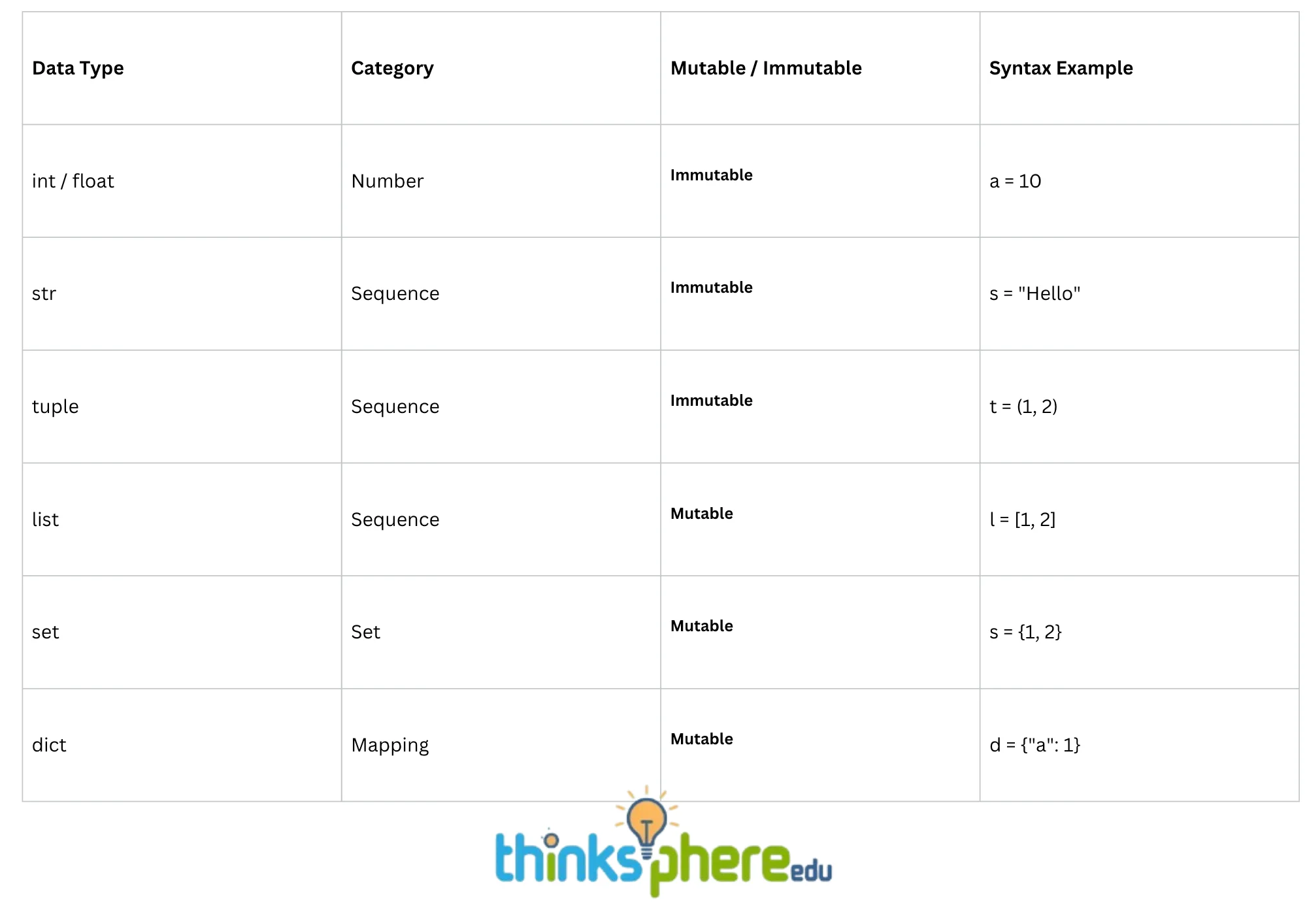
- Mutable Data Types: Data types whose values can be altered in-place without altering their memory address identifier.
- Immutable Data Types: Data types whose internal values cannot be modified in-place after creation. Modifying them forces Python to allocate a new memory object.

Mutability Summary Table
8. Operators in Python (Getting Started with Python Class 11 Notes)
Operators are specialized symbols used to perform computations on variables and values (operands).
1. Arithmetic Operators

2. Relational (Comparison) Operators
Used to compare two values, returning either True or False.
Assume x = 10 and y = 20:

3. Assignment Operators
Assigns right-hand values to left-hand variables.

4. Logical Operators
Used to combine conditional statements.

5. Identity Operators
Determines if two variables point to the same memory object.

6. Membership Operators
Tests whether a sequence contains a specified element.

9. Expressions and Precedence of Operators
An expression is a valid combination of constants, variables, and operators that evaluates to a single value.
Operator Precedence Hierarchy (Highest to Lowest)
1. () –> Parentheses (Groupings)
Parentheses are used to group expressions and dictate the order of evaluation explicitly. Operations within parentheses are performed first, allowing for control over the sequence of operations.
2. ** –> Exponentiation
The exponentiation operator raises a number to the power of another. It has a higher precedence than multiplication and division, ensuring that exponentiation is calculated before these operations.
3. +x, -x, ~x –> Unary Plus, Unary Minus, Bitwise NOT
Unary operators, such as unary plus (indicating a positive value), unary minus (negating a value), and bitwise NOT (inverting bits), are evaluated next. They modify a single operand and are processed before binary operations.
4. *, /, //, % –> Multiplication, Division, Floor Division, Modulus
These operators handle various forms of division and multiplication. They share the same precedence level, meaning they are evaluated from left to right in expressions.
5. +, - –> Addition, Subtraction
Addition and subtraction follow multiplication and division in the hierarchy. Like the previous group, they are evaluated from left to right.
6. <, <=, >, >=, ==, != –> Relational Comparison Operators
These operators are used to compare values. They evaluate to boolean results and are processed after arithmetic operations.
7. =, +=, -=, *=, /=, etc. –> Assignment Operators
Assignment operators assign values to variables. They have lower precedence than comparison operators, meaning that comparisons will be evaluated before assignments.
8. is, is not –> Identity Operators
These operators check whether two references point to the same object in memory. They are evaluated after assignment operators.
9. in, not in –> Membership Operators
Membership operators check for the presence of a value within a collection (like lists or dictionaries). They are evaluated after identity operators.
10. not –> Logical NOT
The logical NOT operator negates a boolean value. It has a higher precedence than logical AND and OR operators.
11. and –> Logical AND
The logical AND operator evaluates to true if both operands are true. It has a lower precedence than NOT but higher than OR.
12. or –> Logical OR
The logical OR operator evaluates to true if at least one operand is true. It has the lowest precedence among the logical operators.

Evaluation Example:
Evaluate 15.0 / 4 + (8 + 3.0) step-by-step:
# Step 1: Solve Parentheses (8 + 3.0) -> 11.0
15.0 / 4 + 11.0

# Step 2: Division takes higher precedence over addition (15.0 / 4) -> 3.75
3.75 + 11.0

# Step 3: Addition
14.7510. Input and Output Statements (Getting Started with Python Class 11 Notes)
Programs interact with users by accepting input and returning processed results.

1. User Input: input() Function
- Accepts data from the user through the keyboard.
- CRITICAL NOTE: The
input()function always returns user data as a string (str) regardless of what is typed.
user_age = input("Enter your age: ")
# If user inputs 18, user_age holds string '18', NOT integer 18To use numeric inputs for calculations, wrap input() inside explicit type conversion functions like int() or float():
age = int(input("Enter your age: ")) # Converts input string to integer
marks = float(input("Enter percentage: ")) # Converts input string to float2. Standard Output: print() Function
Outputs evaluated expressions or text to the screen.
print(value1, value2, ..., sep=' ', end='\n')sep(Separator): Defines the character used to separate multiple arguments insideprint(). Default is a blank space' '.end: Defines what character is printed at the very end of the output. Default is a new line character'\n'.
print("Class", 11, "CS", sep="-")
# Output: Class-11-CS

print("Hello", end=" ")
print("World")
# Output: Hello World11. Type Conversion (Type Casting) (Python basics Class 11 NCERT)
Type conversion is the process of changing a variable from one data type to another.

1. Explicit Type Conversion
Performed manually by the programmer using built-in conversion functions.

# Program: Adding two number strings using Explicit Type Casting
num1_str = "25"
num2_str = "45"

total = int(num1_str) + int(num2_str)
print("Sum:", total) # Output: Sum: 702. Implicit Type Conversion (Coercion)
Handled automatically by the Python interpreter during execution when combining different compatible data types. Python promotes smaller data types to wider data types to prevent data loss (Type Promotion).
int_val = 10      # Integer
float_val = 20.5  # Float

sum_val = int_val + float_val
print(sum_val)        # Output: 30.5
print(type(sum_val)) # Output: <class 'float'>In this example, Python automatically converts int_val (10) to a float (10.0) before performing addition, ensuring precision is maintained.
12. Program Errors and Debugging (Python basics Class 11 NCERT)
Debugging is the systematic process of identifying, tracing, and resolving errors (bugs) in software code.

1. Syntax Errors
Occurs when code violates the structural grammar rules of the Python language. The interpreter detects syntax errors before execution starts and halts immediately.
- Examples: Missing parentheses
print "Hello", missing colons afterifstatements, or unclosed string quotes.
# Invalid Code:
print("Class 11 Computer Science
# SyntaxError: EOL while scanning string literal2. Logical Errors (Semantic Errors)
Occurs when a program runs without crashing but produces incorrect results due to flaws in logic. The interpreter cannot detect logical errors because the code is syntactically correct.
- Example: Calculating the average of two numbers without using parentheses.
# Incorrect Logic:
num1 = 10
num2 = 20
average = num1 + num2 / 2  # Evaluates to 10 + 10 = 20.0 (Incorrect!)

# Correct Logic:
average = (num1 + num2) / 2 # Evaluates to (30)/2 = 15.0 (Correct!)3. Runtime Errors
Occurs while the program is actively executing. The syntax is correct, but an unexpected condition causes the interpreter to crash.
Common Runtime Errors in Class 11:
ZeroDivisionError: Attempting to divide a number by zero.ValueError: Passing an invalid argument type to a function (e.g., converting non-numeric text to an integer:int("apple")).
# Example of ZeroDivisionError:
num1 = 10
num2 = 0
result = num1 / num2 # Runtime Error: ZeroDivisionError: float division by zero12. Chapter Summary & Quick Revision Key Points
To help you review quickly before exams, here is a summary of the core concepts covered in this chapter:
- Interpreter vs Compiler: Python uses an interpreter to process code line-by-line, stopping immediately when an error occurs.
- Execution Modes: Interactive mode (
>>>) gives instant execution feedback but does not save code, whereas Script mode saves code in.pyfiles for future execution. - Keywords & Identifiers: Keywords are reserved words (case-sensitive). Identifiers are custom names that must start with an alphabet or underscore, never a digit.
- Memory Model: Variables in Python do not store values directly; they store references (pointers) to memory objects.
- Data Mutability: Immutable types (
int,float,str,tuple) cannot be modified in-place. Mutable types (list,set,dict) can be updated in-place without changing memory IDs. - Precedence & Types: Parentheses have the highest operator precedence. Type conversion occurs explicitly (via functions like
int(),float(),str()) or implicitly (via type promotion). - Error Types: Syntax errors break language rules, logical errors produce incorrect calculations, and runtime errors crash programs during execution.